

Is custom software worth the investment compared to off-the-shelf tools? A practical look at where the ROI actually comes from.
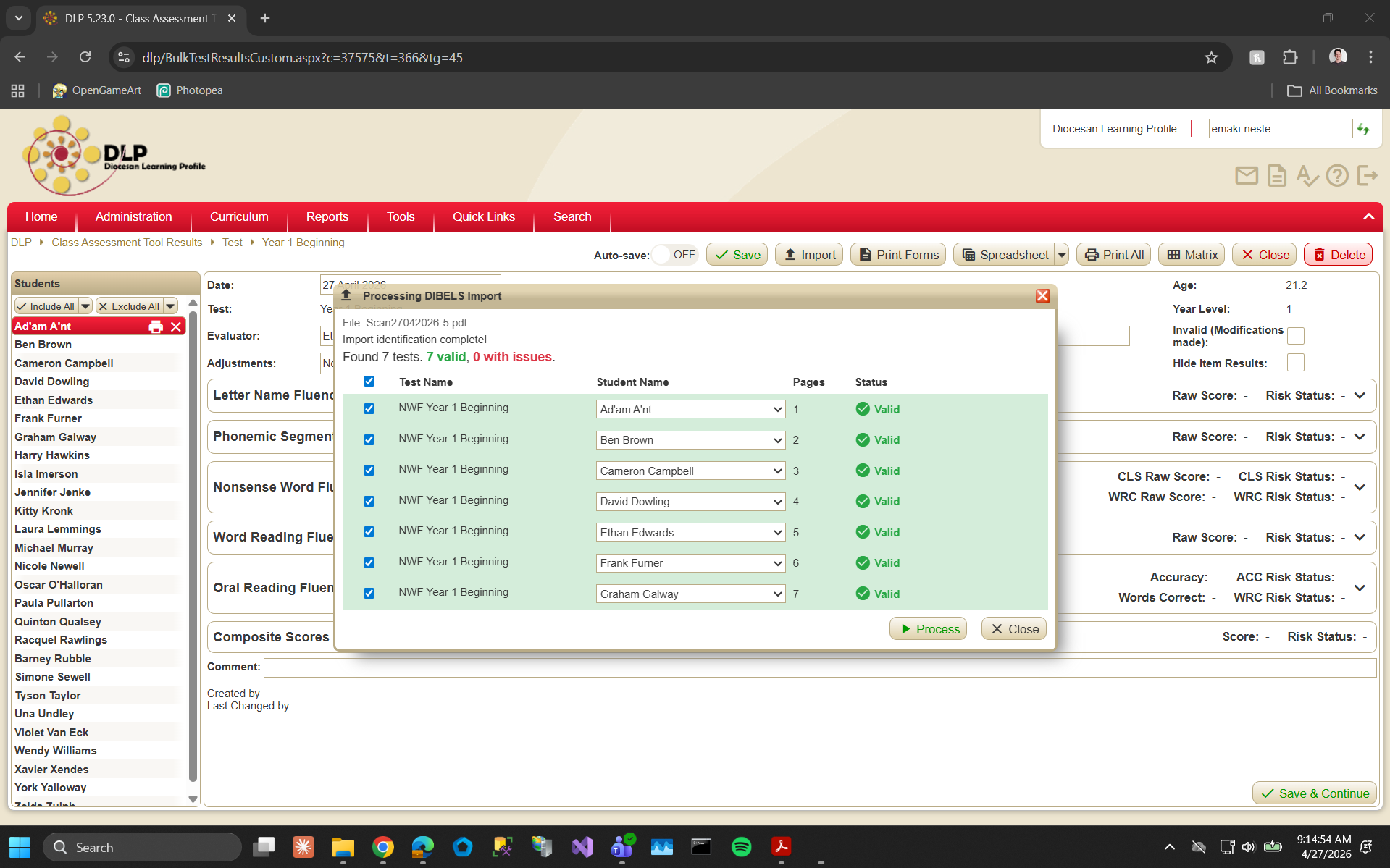
How JDM Software integrated the DIBELS reading assessment into the Diocesan Learning Profile using computer vision — processing 120,000 pages annually and freeing the equivalent of a full-time resource.

Case Study: Eliminate Barcode Scanning with STRICH

JDM Software Is Proud to Support the Launch of Top End Classing (TEC)

JDM Software Are Finalists in the Little Pig Consulting Toowoomba Chamber of Commerce Business Excellence Awards 2025!

Enhancing Australian Businesses for 21 Years With Custom Software

Celebrating Excellence: Proudly Supporting the Toowoomba Catholic Schools Excellence Awards When the opportunity came to support the Toowoomba Catholic Schools Excellence Awards it was an unequivocal yes! Having worked with Toowoomba Catholic Schools since 2008 on the Diocesan Learning Profile, we're constantly inspired by the late nights, the juggling acts, and the sheer determination it takes to give every student the attention they deserve. Hence, we are overjoyed to support the inspiring and expert staff of TCS as they look to create exemplary places of learning where every student experiences academic success and comes to know and experience the loving presence of Jesus. On the night, David Berting of JDM had the honour of awarding Prep teacher Jesse Curtis with the Primary/Kindergarten expert teacher award. This award brings us right back to the roots of our relationship with TCS. In 2006 we first started developing a curriculum tool for Prep which led into the holistic Diocesan Learning Profile we work on today. It is therefore fitting that we get to celebrate Jesse with this award - congratulations Jesse.

Webhooks vs APIs: Complete Business Guide for Software Integration [2025] Understanding the difference between webhooks and APIs is crucial for business owners looking to automate their software systems efficiently. While both technologies enable software integration, they serve different purposes and can significantly impact your development costs and system performance. This comprehensive guide explains when to use webhooks vs APIs, their cost implications, and practical implementation strategies for business automation.

API integration is transforming how small businesses handle data entry and software management. Instead of manually copying information between systems, smart business owners use automated systems to eliminate repetitive tasks and focus on growth. How often do you find yourself and your team copying data from one piece of software and pasting it into another? Maybe you're still manually entering invoices into Xero or scrolling through PDF documents, double and triple checking you've got your data correct before hitting save. Perhaps you're keying in the same data into three or four different places because your business software just doesn't talk. If this sounds familiar, you're not alone. This is time being wasted on digital paperwork that you and your team could be using on what really matters: growing your business, serving your customers, and doing the work you actually love. The Hidden Cost of Software That Won't Talk On the surface, your business looks like it's running as it should. Invoices are being sent, data is getting entered, and problems are being solved when they arise. But when you start drilling down into what's actually happening, you'll discover inefficiencies that are silently slowing down your progress. Productivity losses, time wasting, employee dissatisfaction, and recurring errors all have real impacts on your bottom line and real impacts on your customers—the lifeblood of your business. According to Gartner research: 52% of IT leaders believe customer experience is their top priority 42% of leaders anticipate the global economy will negatively affect their business 30% say employee engagement and motivation is their most important talent-related obstacle Without proper software integration, these challenges become even more pronounced. Manual data entry doesn't just waste time—it creates a cascade of problems that affect every aspect of your business operations. What Are APIs and How Do Business Software Integrations Help? API integration creates automated connections between your different pieces of software. Most modern business software features Application Programming Interfaces (APIs)—digital connectors that let developers communicate directly with the software instead of going through the user interface. This automation enables you to seamlessly handle tasks like: Automatic customer data synchronisation Triggered workflows and notifications Automated invoice creation and sending Real-time inventory updates across platforms Error-free data transfer between systems A Practical API Integration Example Let's say you currently run a report from your timesheet software and manually enter payroll information into Xero every fortnight. This process takes 2 hours, introduces potential errors, and delays your payroll cycle. With API integration, your timesheet software automatically sends approved hours directly to Xero. The result? Your 2-hour manual process becomes a 5-minute automated workflow that runs without errors every time. Success Stories of Real-World Integrations Retail Industry Transformation: JDM helped a retail client win more customers through streamlined invoicing integrations with Xero. This simple yet effective automation delivered significant time savings for their SaaS customers while setting them apart from competitors who still relied on manual processes. Agricultural Efficiency Gains: In the agricultural sector, JDM implemented automated document processing solutions that handle PDF documents, CSV files, Word documents, and Excel spreadsheets. These integrations eliminated manual data entry errors and created seamless, automated workflows with third-party systems. Measurable Results: Invoice processing time reduced from 2 hours to 15 minutes per week Data entry errors eliminated through automated validation Staff productivity increased by 30% on administrative tasks Customer satisfaction improved due to faster, more accurate service Getting Started: Your API Integration Roadmap The path to automated business software integration begins with identifying your biggest pain points. What processes are consuming the most time or causing the most frustration for you and your staff? Step 1: Audit Your Manual Processes Document every task where you're manually moving data between systems. Track the time spent and frequency of errors for each process. Step 2: Research Your Software's API Capabilities Explore what integration options your current software provides. Contact your support team or search online for "[Your Software Name] API integration" or "[Your Software Name] automation options." Step 3: Choose Your Integration Approach If your software doesn't have built-in integrations, you have several options: DIY Integration Platforms: Tools like Zapier or Make offer drag-and-drop interfaces to connect your APIs and automate workflows without coding knowledge. Custom Development: Work with a software development team to create perfectly tailored integrations that match your exact business processes. Hybrid Solutions: Combine platform tools with custom development for complex workflows that require specialised functionality. Step 4: Start Small and Scale Up Begin with your highest-impact, lowest-complexity integration. Success with one automated workflow builds confidence and demonstrates ROI for larger integration projects. Transform Your Business with Smart Software Integration API integration isn't just about eliminating manual data entry—it's about creating more efficient, accurate, and scalable business operations. When your software systems communicate automatically, you reduce errors, save time, and free your team to focus on strategic growth activities. Businesses that embrace automated data entry and software integration today will have a significant competitive advantage tomorrow. Stop allowing manual processes hold back your growth potential. Are you ready to explore how API integration can transform your business operations? Start by identifying your biggest time-wasting manual process and researching the integration possibilities for your current software stack.

How JDM Software helped Namoi Cotton automate resource-heavy processes and build a custom software solution tailored to their agricultural operations — delivering huge efficiency gains and long-term support.